


Reply on Avito first - and win the customer
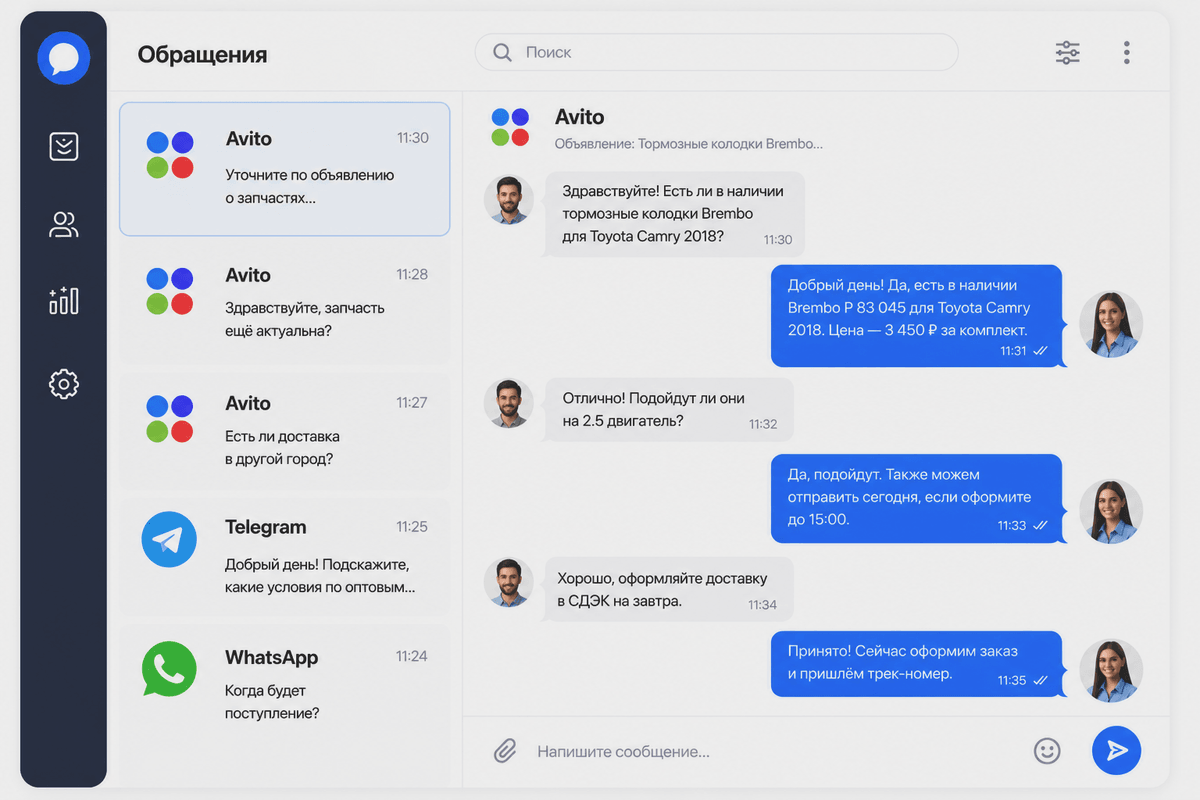
A buyer messages five sellers at once and buys from whoever replies first. Teletype gathers all Avito chats into one inbox, distributes conversations across operators and sends leads to your CRM. And with the AI manager connected, it automates lead handling.
- All Avito accounts in one inbox - no re-logins
- Leads - straight into Bitrix24, amoCRM, Kommo or SberCRM
- See response speed and load for every operator
- Automation - chatbots, auto-replies and scenarios
- Set up in 15 minutes
- Any number of Avito accounts
- 7 days unlimited













.png)

















@1080w.png)



@420w.png)




Why Avito leads get lost
A buyer on Avito messages several sellers at once - and buys from whoever replies first. With manual handling, even strong stores lose Avito leads.
-
Replied late - bought from someone else
Messages sit in Avito, the manager saw them an hour later.
-
The lead never reached the CRM
Manual transfer: some conversations get lost between Avito, the CRM and spreadsheets.
-
Several accounts - several messes
Managers keep re-logging in, no one has the full picture.
-
The manager finds out last
It's not clear who replies slowly and which chats are stuck.
What Teletype App gives Avito sellers
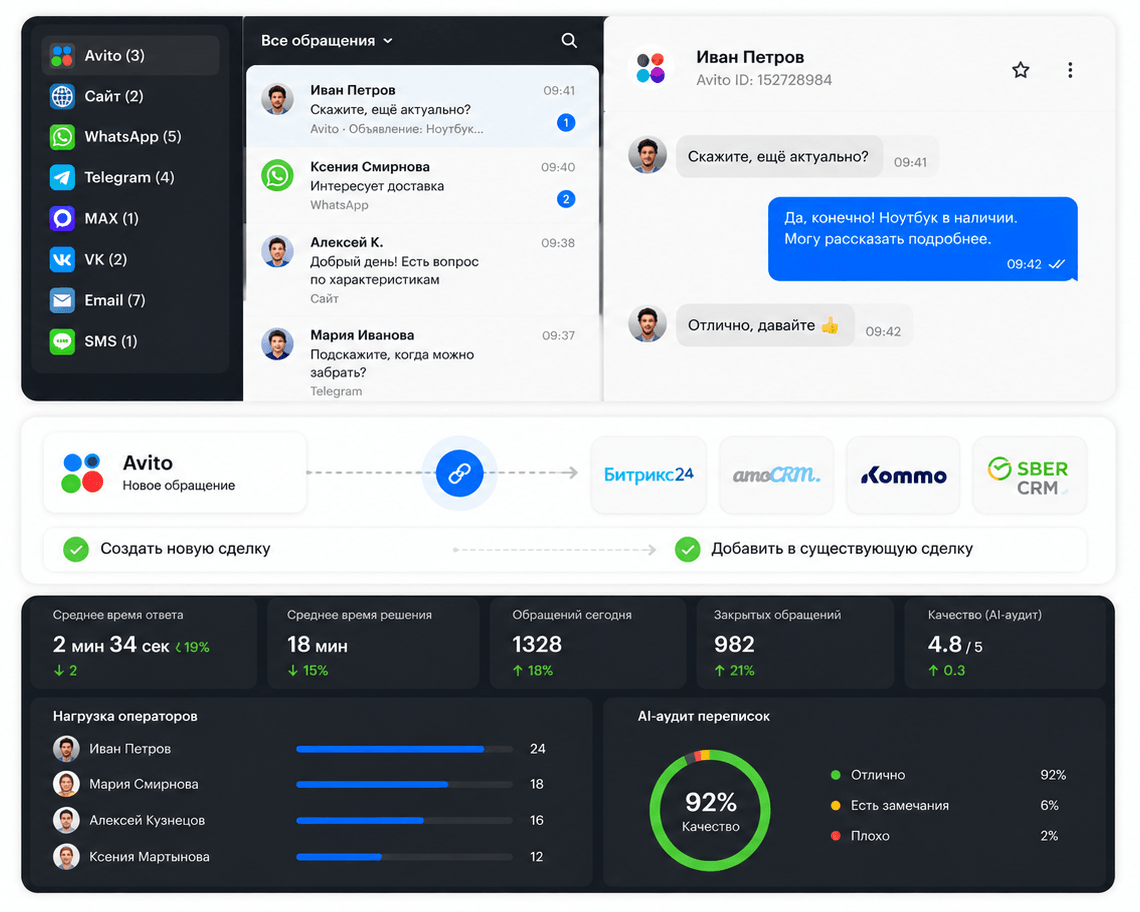
Teletype is a single inbox for all conversations that connects Avito, your team and your CRM. For an Avito seller it solves three tasks:
-
Gathers messages from every Avito channel
Into one inbox - together with your website, WhatsApp**, Telegram, MAX, VK, email and SMS.
-
Passes conversations to your CRM
Bitrix24, amoCRM, Kommo or SberCRM - as a new deal or into an existing one.
-
Shows handling statistics
Response speed, operator load and handling quality, including AI audit of conversations.
How it works
Every Avito conversation follows the same path - from the buyer's first message to a deal in your CRM and statistics for the manager.
-
A buyer messages you on Avito
On any listing, in any of your Avito channels.
-
The message appears in the Teletype panel
Next to conversations from your website and messengers.
-
An operator replies from the panel or the CRM
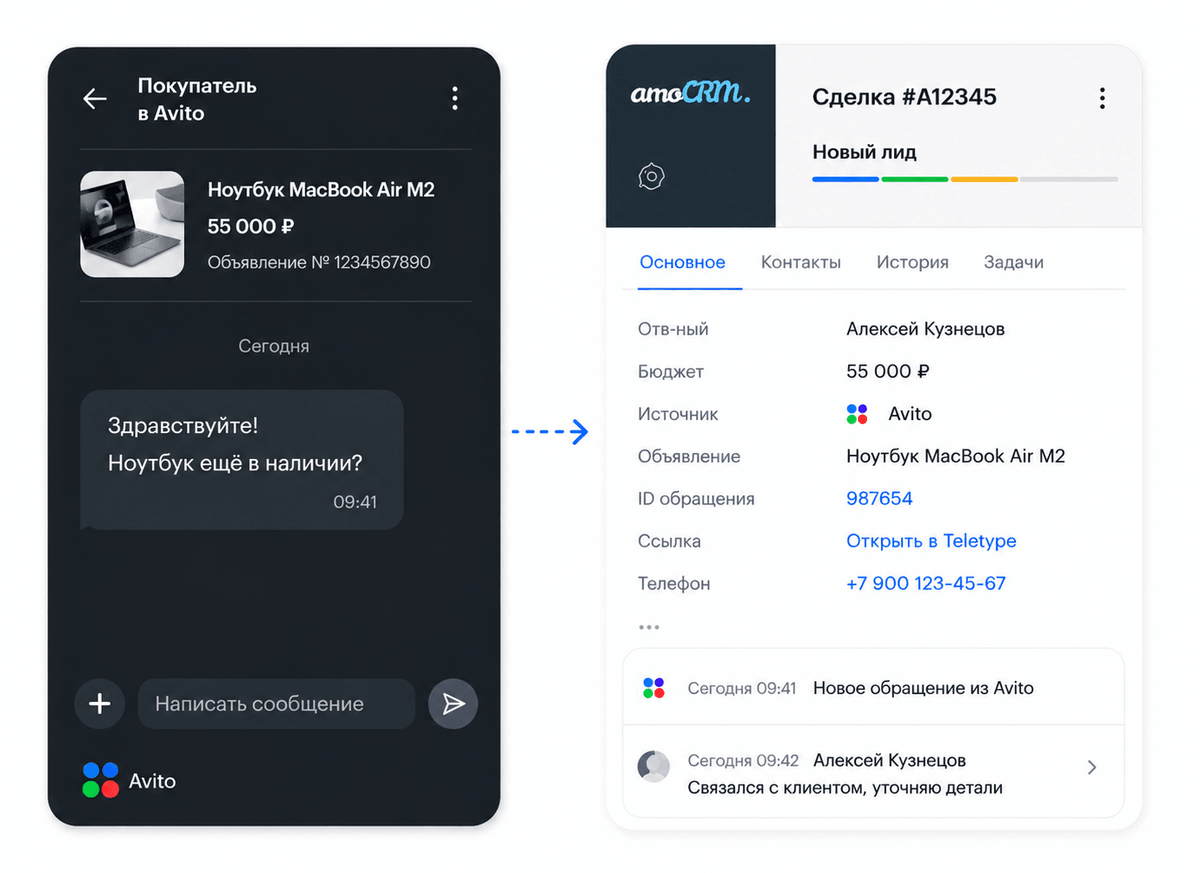
An Avito conversation becomes a deal in your CRM right away - new or existing.
-
History is saved, statistics are counted
The manager sees response speed, load and handling quality.
- 7 days free
- Set up in 15 minutes
Handle leads even faster
Teletype isn't only for passing an Avito conversation to your CRM. It helps the team handle a lead faster: distribute it between operators, reply from the CRM or the Teletype panel, use templates, statuses, tags and notes - and lets the manager see response speed, load and conversation quality.
-
Channels and operators
- any number of Avito channels - no limits
- channel visibility per operator: each sees only their own
- conversation distribution - no chats left «ownerless»
- no re-logins between accounts
-
Fast handling
- replies from the CRM or the Teletype panel - history is saved
- templates for common questions
- statuses and tags - see what needs a reply
- client notes for the whole team
- text and images in Avito chats
-
Manager's control
- response speed of each operator
- operator load
- stuck chats visible at once
- lead statistics by channel
- AI audit of conversations - quality without reading every chat
Can't keep up with replies? - Connect the AI manager
The AI agent connects to your Avito listings, replies to the buyer instantly, clarifies their need and budget, and hands the manager a ready lead - with a dialog summary and a record in your CRM. The customer doesn't wait; the manager doesn't burn time on repetitive questions.
-
Lead qualification
The agent clarifies the need, budget and timeline and hands the manager a short summary: what the customer wants and how qualified the lead is.
-
Consulting and handoff
Answers typical questions about availability, delivery and payment, and brings in a manager when the customer is ready for the next step.
-
Auto-closing routine deals
Guides the customer to a booking, reservation or order. Complex or non-standard cases go to a human.
We'll show a demo and put together a test scenario for your business.
How businesses use Teletype for Avito
-
Auto-parts seller: profiles don't scatter
Before: several Avito profiles were handled manually, and a late reply sent the buyer to another seller. After: all profiles in one panel, new chats visible at once - none lost between accounts.
-
Different lines - no access mix-ups
Before: Avito profiles belonged to different business lines, and access and responsibility got mixed up. After: channel visibility is set per operator - each works only with their own profiles and conversations.
-
The manager sees handling, not just leads
Before: with a heavy flow it wasn't clear who replies and which chats are stuck. After: statistics, operator load and AI audit of conversations reveal the bottlenecks without reading every chat.
Avito leads - in your CRM
Connect a CRM integration - and Avito conversations land straight in your CRM. Each becomes a deal - new or existing. A manager replies to the buyer from the CRM or the Teletype panel, and the full conversation history is saved.
-
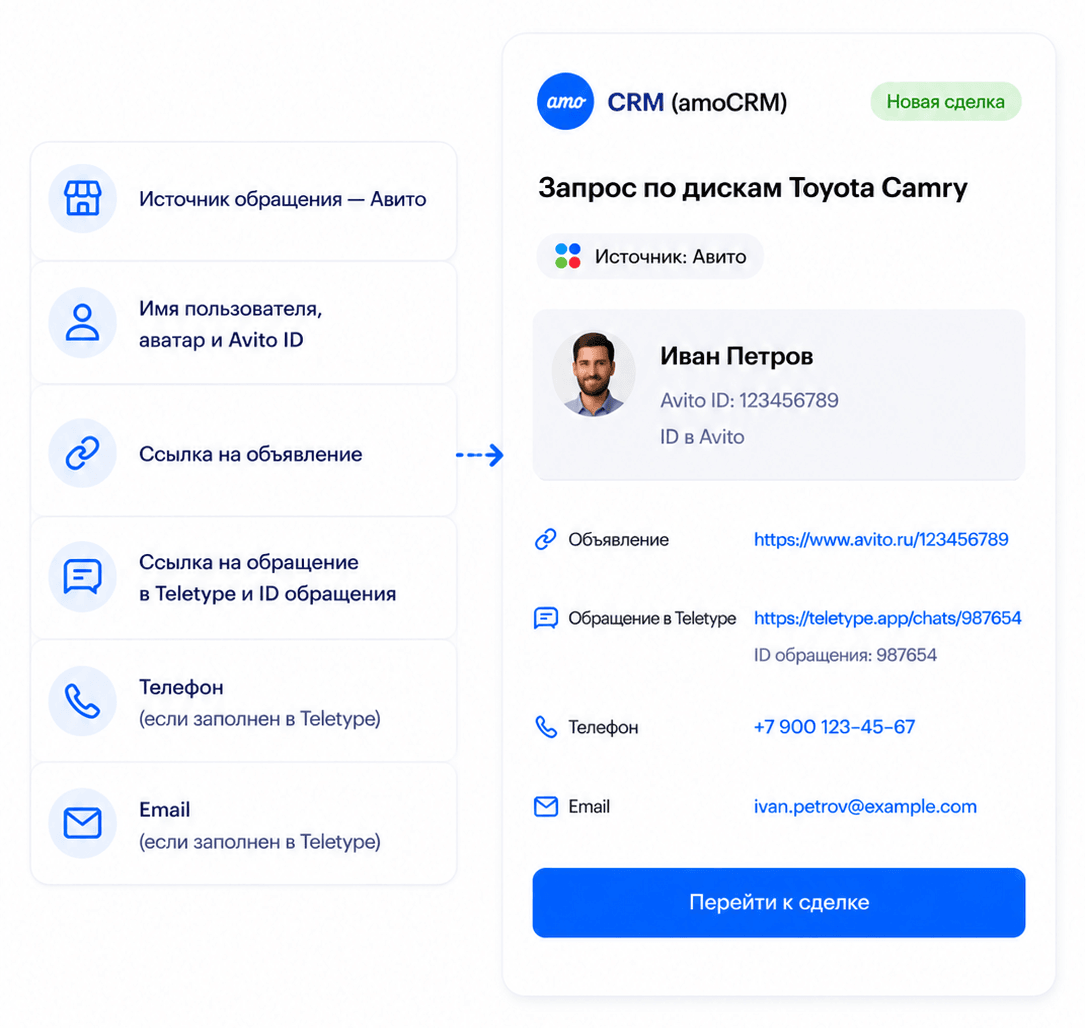
What can be passed from Avito to the CRM
- conversation source - Avito
- the user's name, avatar and Avito ID
- a link to the listing
- a link to the conversation in Teletype and the conversation ID
- phone and email - only if already filled in Teletype
-
How to avoid duplicates
- In your CRM you can set up «Duplicate control» and add an Avito ID field
- Bitrix24: messages for an open deal land in the open-channels chat
- the mechanics depend on the CRM and settings
Avito, CRM, website and messengers - in one handling system
Avito isn't the only channel where buyers message a business. In Teletype you can connect your website, WhatsApp**, Telegram, MAX, VK, email and SMS, and handle conversations in one panel. Leads can be linked to your CRM and other work tools. If your system isn't on the list, Teletype can be linked via API or you can check the option with support.


.svg@500w.png)






.png)










How to connect Avito to Teletype
Connecting takes a few minutes. A detailed step-by-step guide with screenshots is in the knowledge base.
-
Sign up and add the Avito channel
Create a Teletype account and add the Avito channel.
-
Authorize the account
Via OAuth or a token.
-
Connect your CRM and add operators
If needed, connect your CRM and invite operators.
-
Support will help with setup
If any questions come up, support will help you connect.
Questions and answers
- How do I get Avito leads into a CRM via Teletype?
- Connect an Avito channel and a CRM integration: with the integration set up, an Avito conversation can be created in the CRM as a new deal or land in an existing one - depending on the CRM's logic and settings.
- Can I reply to Avito customers from the CRM?
- Yes. A manager can reply to the customer from the familiar CRM or from the Teletype panel - whichever is more convenient for the team. The conversation history is saved.
- What can be passed from Avito to the CRM?
- The CRM can receive the conversation source, the user's name, avatar and Avito ID, a link to the listing, a link to the conversation in Teletype and the conversation ID. Phone and email - only if already filled in Teletype: Avito itself usually doesn't pass them. The exact set depends on the CRM and settings.
- Can I connect several Avito channels and split them between operators?
- Yes. You can connect any number of Avito channels - no limits. Channel visibility is configurable: each operator sees only the channels they should work with.
- How does Teletype help handle Avito messages faster?
- All Avito channels are gathered in one panel, conversations can be distributed between operators, common questions closed with templates, and statuses and tags help see which chats need a reply. Text and images are supported in Avito via Teletype.
- How does a manager control Avito leads?
- In Teletype you can see response speed, operator load and stuck chats. AI audit of conversations helps assess handling quality without reading every conversation manually.
- How do I connect Avito to Teletype?
- Sign up for Teletype, add the Avito channel and authorize the account via OAuth or a token. Then connect your CRM if needed and add operators. If any questions come up, support will help with setup.
- How do I avoid duplicates in the CRM?
- In amoCRM and Kommo you can set up «Duplicate control» and add an Avito ID field. In Bitrix24 messages for an already-open deal can land in the open-channels chat. The mechanics depend on the CRM and settings.
More: what «Avito CRM» means and where Teletype fits in
People often search for this as «Avito CRM»: they want Avito messages not to get stuck in the personal account, but to land in the CRM right away, get shared between managers and stay visible to the team lead. That's exactly what Teletype does - it gathers your Avito chats in one inbox and links them to your CRM.
Teletype doesn't replace your CRM, it works alongside it. It collects every Avito message in one panel, helps share them between managers, passes leads to your CRM, and lets you reply to the customer straight from the CRM or from Teletype. And statistics and AI audit show how fast your team responds.
Connect Avito and take control of your leads
We'll help connect Avito and link conversations to your CRM. Start for free and test the scenario on your real leads.
Set up in 15 minutes · Any number of Avito accounts